Live preview
Compare original and result side by side and detect conflicts before any file is changed.

Combine replacement, numbering, dates or metadata. rsk.rename shows proposed names and possible conflicts before you run the job.
Large file sets need a repeatable, controlled process.
Photos from different sources, cryptically named exports, or documents that must follow a fixed schema: rsk.rename processes entire folders using precise rules.
Review the result in the preview, save recurring processes, and automate them through the command line when needed.
rsk.rename 2 goes far beyond search and replace. Combine rules, inspect results live, save workflows, and automate them when needed.
Try version 2Compare original and result side by side and detect conflicts before any file is changed.
Combine replacement, numbering, dates, metadata, regular expressions, and custom JavaScript logic.
Do more than rename files—organize them in the right location within the same workflow.
Save recurring jobs and run prepared workflows automatically through the CLI.
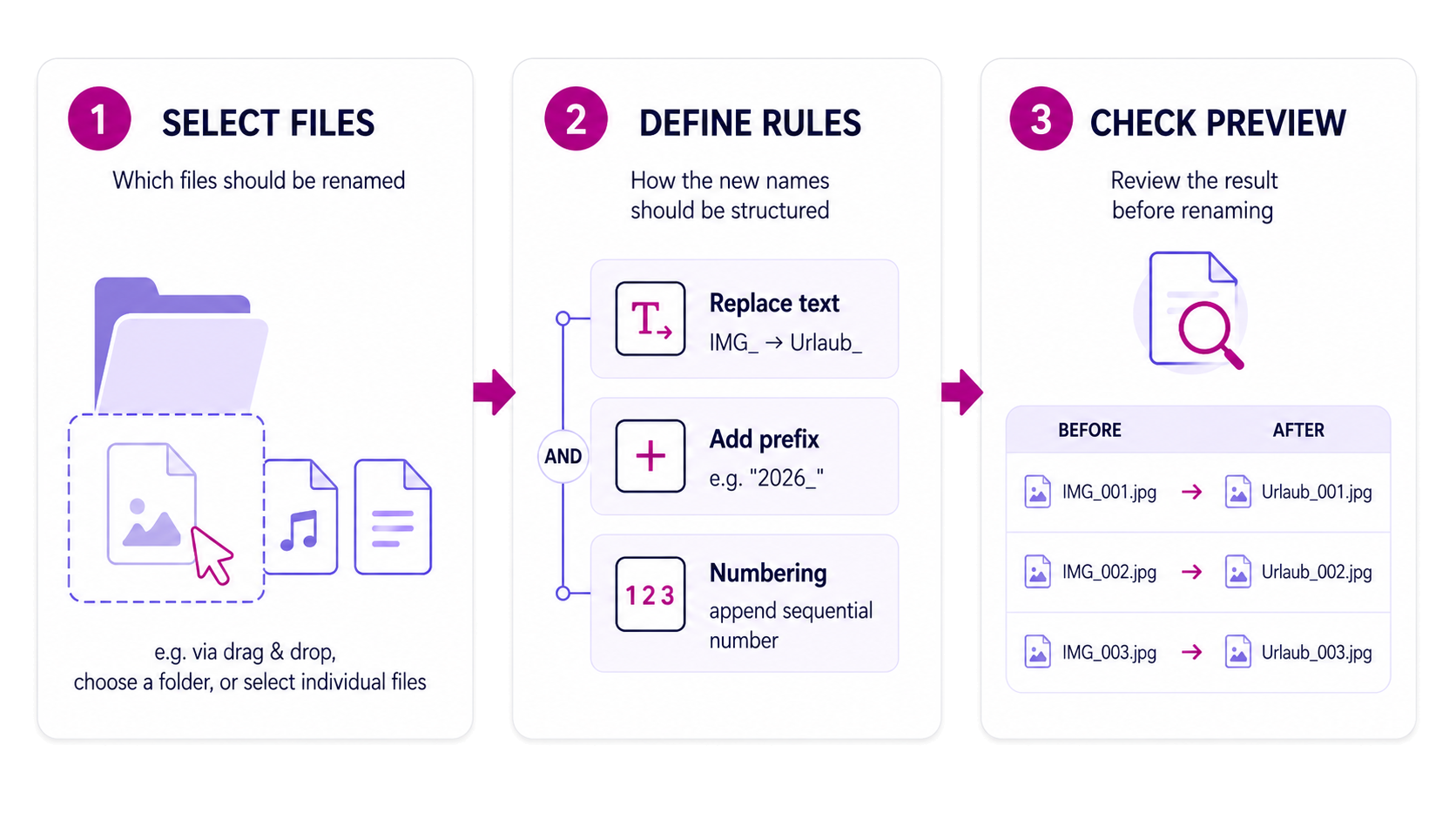
Select your files and define exactly what should happen to them.
Next, you build your rules. Simple replacements, numbering, date values, metadata, regular expressions, or custom JavaScript logic can be combined with one another.
Before rsk.rename changes anything, you see the result.
You only carry out the process when everything is right.
Add individual files or entire folders. You can see exactly what you’re working with.
Build exactly the workflow you need. One rule or several in sequence—ranging from simple replacement to custom logic.
The preview shows you the new file name and potential conflicts before any actual changes are made.
Try it · right in your browser
Change the rules and see the resulting names immediately. File extensions are preserved.
Changes are applied from top to bottom.
| Original | New | Status | Message |
|---|---|---|---|
| scan_invoice.pdf | Project_invoice_01.pdf | OK | – |
| scan_contract.pdf | Project_contract_02.pdf | OK | – |
| scan_notes.txt | Project_notes_03.txt | OK | – |
Preview: 3 · file extensions are preserved.
This demo is solely intended to illustrate how the application works. Its layout and functionality may differ from the actual application.
Quite a lot. Here are a few typical jobs for which I would have built rsk.rename myself.
For example, IMG_4821.jpg , IMG_4822.jpg , and IMG_4823.jpg become:
Sommerfest_2026_001.jpg Sommerfest_2026_002.jpg Sommerfest_2026_003.jpg
Remove cryptic elements from filenames, add a date, or bring regularly generated files into a consistent format.
Don’t just rename files; copy or move them directly to the right location.
If you regularly need the same workflow, simply save it as a preset and use it again next time.
And if your use case becomes more specific, regex, JavaScript rules and the command line are available.
From quick replacements to metadata, JavaScript, presets, and CLI automation, rsk.rename covers both everyday jobs and advanced workflows.
The product page helps you decide. The complete reference is organised separately.
Rename entire file batches with consistent rules and check every planned name before you apply them.
Open use casePut photos from different sources into a clear sequence with a prefix, numbering and a preview.
Open use caseCorrecting an error in a single file is quick. With a thousand files, it’s a different story.
That is why the preview is one of the most important parts of rsk.rename for me.
You see the original and new filenames side by side. Conflicts become visible before you start the process. And the operation only begins once the result looks exactly the way you want it to.
Directly compare original and result → Detect conflicts before execution → Check first, then execute
rsk.rename can also copy and move files. You can save recurring workflows as presets and reuse them later.
And if you want to automate a workflow, you can execute saved presets via the command line.
So you can start small.
And go pretty far, if you like.
Drop in the files, create a rule, check the preview, and you’re done.
Save your settings as a preset and recall them next time.
Use placeholders, regular expressions, and custom JavaScript logic.
Execute prepared presets via the command line and integrate rsk.rename into existing workflows.
The test version is there so that you can not only look at rsk.rename , but actually try it out.
For seven days, you can use every rsk.rename feature without file limits or locked functions.
That is perfectly sufficient for a first real workflow.
After the seven days, a valid license is mandatory to continue using rsk.rename.
By purchasing, you accept our Privacy Policy, Cancellation Policy, Refund Policy and the EULA for rsk.rename. Payment processing by Paddle.

Hi, I’m Christian.
The idea behind rsk.rename is quite simple: If a computer can reliably perform a task for me, I don’t want to do it by hand hundreds of times.
These are exactly the kind of tools I enjoy developing.
rsk.rename is designed to deliver quick results for simple tasks, yet not suddenly hit its limits when a job becomes somewhat more specialized.
If you have a question, find a bug, or have an idea for the application, you can write to me directly.
The most important answers about the application, trial, and licence.
Yes. rsk.rename shows you the planned result in the live preview before any files are actually modified.
Yes. You can rename, copy, or move files and incorporate these steps into your workflow.
Yes. You can save recurring workflows as presets and reuse them later.
Yes. For more complex tasks, you can use regex and custom JavaScript rules, among other things.
Saved presets can also be executed using the included command-line tool.
For seven days, you can use every rsk.rename feature without restrictions. After this period, a valid license is mandatory.
No. You purchase the appropriate license once and can use the licensed major version indefinitely.
Download rsk.rename and try out your own workflow right away.
For Windows · No subscription · Local processing
By purchasing, you accept our Privacy Policy, Cancellation Policy, Refund Policy and the EULA for rsk.rename. Payment processing by Paddle.