More content types
Create QR codes for websites, Wi-Fi, contacts, email, SMS, phone numbers, locations, and free-form content.

Make codes for websites, Wi-Fi and contacts on your Windows PC. Adjust colours, add your logo and export as PNG, SVG, PDF or WebP.
No sign-up. No ad-filled online editor. And no wondering what actually happens to the data you enter.
rsk.qr runs directly on your Windows PC.
Enter content, customize QR code, export. Done.
rsk.qr 2 has grown from a small generator into a versatile local QR tool—with more content types, more customization, and more export options.
Try version 2Create QR codes for websites, Wi-Fi, contacts, email, SMS, phone numbers, locations, and free-form content.
Customize colours and appearance and add your own logo when desired.
See every change immediately and refine the QR code before exporting it.
Export as PNG, SVG, PDF, or WebP—or copy the result straight to the clipboard.
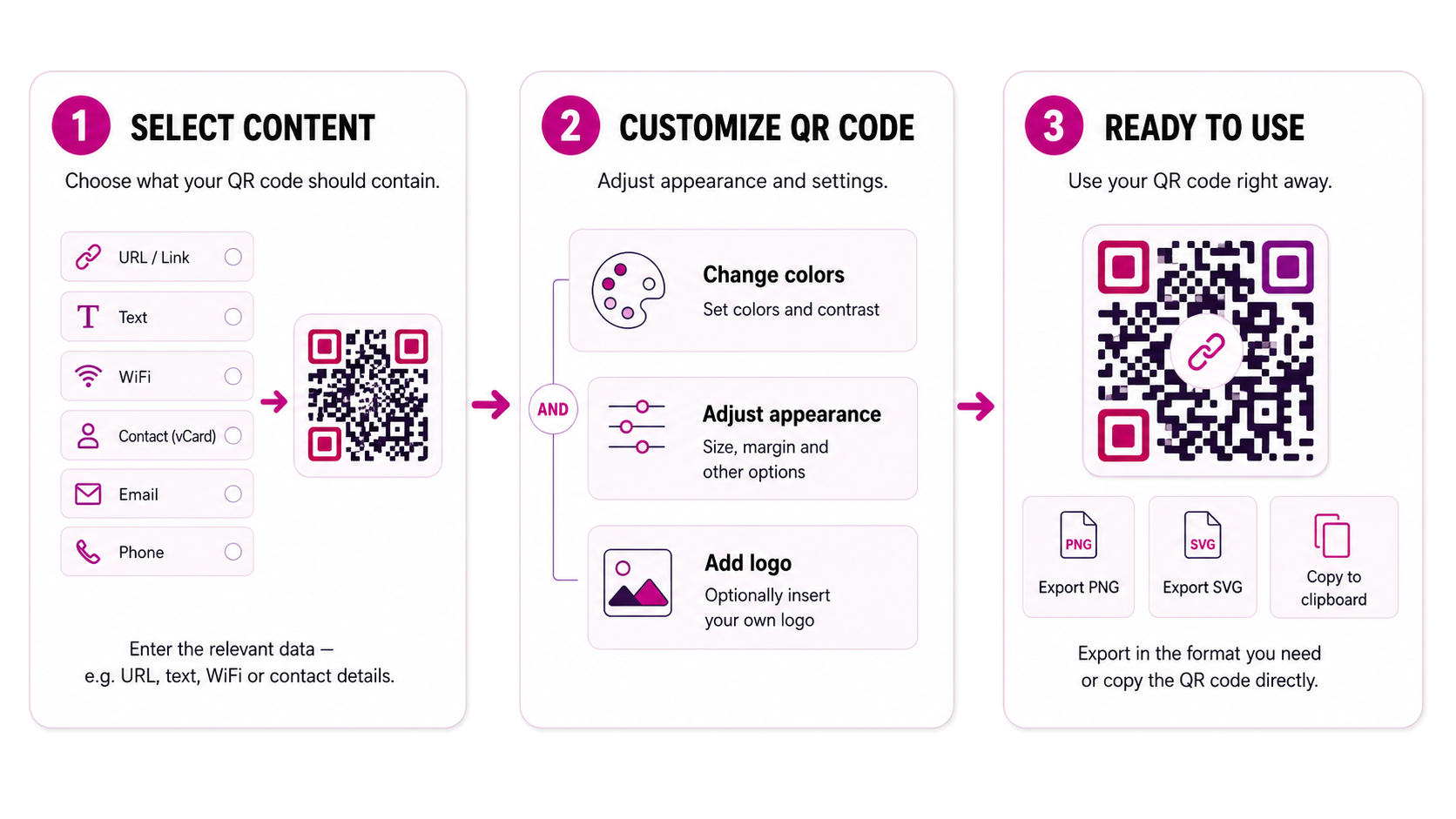
That’s really all it takes.
Select what your QR code should contain and enter the corresponding data.
Adjust colors, appearance, and other settings. You can also incorporate your own logo if you wish.
Export your QR code in the format you need, or copy it directly to the clipboard.
No account. No upload of your content. No detour via an online service.
Try it · right in your browser
Generate a scannable code for a web address or Wi-Fi network. Everything is calculated locally in the browser.
The demo uses black on white. Design and export options are available in the desktop app.
The QR code is generated locally in the browser.
This demo is solely intended to illustrate how the application works. Its layout and functionality may differ from the actual application.
Create QR codes for websites, Wi-Fi access, contact details, emails, phone numbers, locations, and other content.
You can customize the colors and layout and, if desired, integrate your own logo.
You then export the result as PNG, SVG, PDF, or WebP – or copy it directly to the clipboard.
Enter a URL and output it directly as a QR code.
Create a QR code that allows Wi-Fi access to be shared conveniently.
Combine contact details into a QR code so they can be quickly imported.
Prepare email addresses, messages, or phone numbers directly for the appropriate action.
Share geographic locations via QR code.
Simple text and other supported data types can also be generated directly as QR codes.
Choose the content, refine the appearance, and export in the right format—fully local and without an online service.
The product page helps you decide. The complete reference is organised separately.
Make your web address accessible by QR code on flyers and signs, and check the code before printing.
Open use caseLet guests join the intended Wi-Fi network by QR code without typing the password.
Open use caseA classic black-and-white QR code is sometimes just right.
And sometimes, simply not.
With rsk.qr, you can customize colors and appearance to suit your specific use case and integrate your own logo.
You can see the changes directly in the preview. This allows you to experiment with what looks good before exporting the result.
Adjust colors → Use your own logo → See the result directly in the preview
A QR code can be generated directly on your computer.
That is precisely why rsk.qr does it there, too.
When you enter contact details, Wi-Fi credentials, or other content, they do not need to be transmitted to an online service just to generate a QR code.
rsk.qr processes the content locally on your Windows PC.
That is technically straightforward.
And for me, simply the more sensible path.
Local processing
No mandatory cloud connection
No user account
No subscription
With the free trial version, you can explore the application at your own pace and create your own QR codes.
For seven days, every rsk.qr feature is available without restrictions, including all customization and logo options.
After the seven days, a valid license is mandatory to continue using rsk.qr.
By purchasing, you accept our Privacy Policy, Cancellation Policy, Refund Policy and the EULA for rsk.qr. Payment processing by Paddle.

Hi, I’m Christian.
The basic idea behind rsk.qr was simple: I wanted to create a QR code without having to open a website and enter my content into an online form.
So I built my own tool.
And as sometimes happens with software, more and more ideas were added later on.
Today, rsk.qr can do significantly more than the initial version. Yet the core concept remains the same: it should be fast, work locally, and be no more complicated than a QR code generator needs to be.
If you have questions, feedback, or an idea, you can write to me directly.
The most important answers about the application, trial, and licence.
No. The actual generation of the QR codes takes place locally on your computer.
rsk.qr supports various content types such as URLs, Wi-Fi access details, contact information, email, SMS, phone numbers, locations, and other content.
Yes. You can customize colors and various display options, among other things.
Yes. With a licensed version you can integrate your own logo into your QR code.
You can export your QR codes in various graphic formats and also copy them directly to the clipboard.
Yes. For seven days, you can use every rsk.qr feature without restrictions. After this period, a valid license is mandatory.
No. You purchase the appropriate license once and can use the licensed major version indefinitely.
Download rsk.qr, give it a try, and create your first QR code right on your Windows PC.
For Windows · No subscription · Local processing
By purchasing, you accept our Privacy Policy, Cancellation Policy, Refund Policy and the EULA for rsk.qr. Payment processing by Paddle.