Flexible triggers
React to new or changed files, schedules and intervals, or start workflows manually.

Choose triggers, conditions and actions. rsk.guardian monitors selected folders and makes runs and errors traceable.
Sort downloads. Move exports. Archive old files. Unzip ZIP files. Rename specific files or regularly clean up folders.
Each individual task might take only a few minutes.
But why keep doing it at all?
rsk.guardian handles these processes for you. Once set up, it automatically responds to what happens in your folders.
rsk.guardian 2 turns individual file actions into transparent workflows. More capable under the hood, clearer to use, and still completely local.
Try version 2React to new or changed files, schedules and intervals, or start workflows manually.
Filter by name, type, size, age, and other properties—even in more complex combinations.
Copy, move, rename, sort, archive, extract, and log files within a single workflow.
Check rules in advance and retain control with traceable runs and clearer errors.
Validate a workflow before activating it and identify unusual or incomplete configurations early.
Get a plain-language summary of when a rule starts, which files it affects, and what happens next.
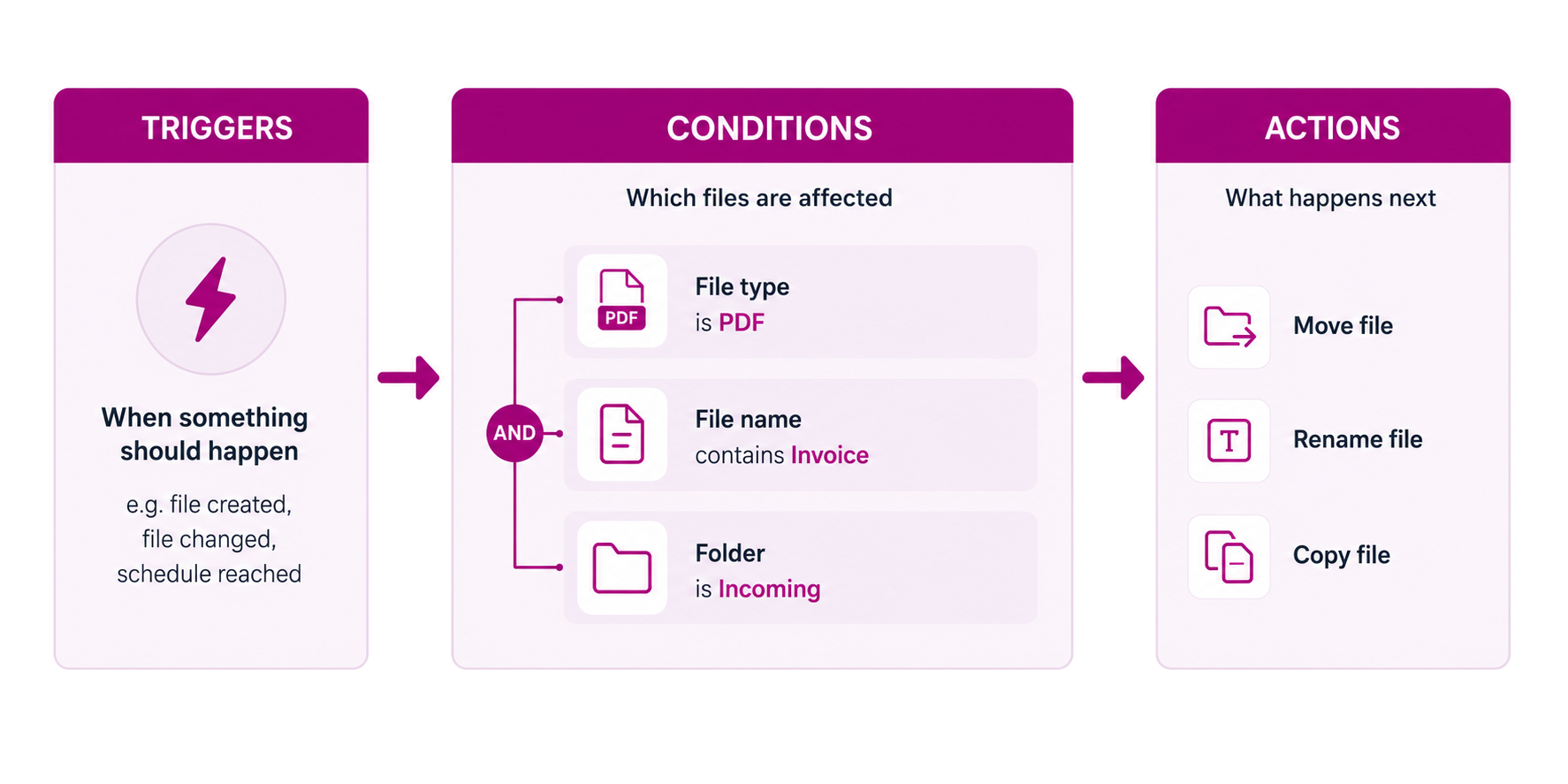
A file is created or modified. A specific time is reached. An interval elapses. Or you simply start the process yourself.
You use conditions to determine exactly which files should be processed—based on name, type, size, age, and other properties.
Copy, move, rename, sort, archive, extract, log, or execute custom workflows.
The rule can be that simple. Or as complex as your workflow requires.
Try it · right in your browser
Choose the trigger, file type and destination. The simulation shows which files your rule affects.
Define triggers, conditions and actions for this rule.
Change triggers, conditions and actions using the tabs. All changes apply only to the example.
The simulation evaluates four prepared file events.
Only files with a matching trigger and type are considered.
No exceptions are set for this sample rule. The demo shows the trigger, file type and Move action.
The sample rule moves matching PDF files to the chosen destination folder.
This demo is solely intended to illustrate how the application works. Its layout and functionality may differ from the actual application.
For example, automatically cleaning up the Downloads folder.
Move regular exports to the correct location.
Automatically extract new archives and process their contents.
Sort files by type, age, or name.
Automatically archive old files.
Or build a completely custom workflow that fits your work perfectly.
rsk.guardian gives you the building blocks. You decide what becomes of them.
rsk.guardian combines flexible triggers, precise conditions, and multi-step actions into traceable file workflows. Open a section for details.
The product page helps you decide. The complete reference is organised separately.
Move matching new downloads according to your rules instead of repeatedly tidying the folder by hand.
Open use caseSend recurring export files to the right destination folder automatically after they are created.
Open use caseBefore you unleash a new rule on your files, you can check what would happen.
Executions are logged, errors remain traceable, and you can see which files were processed.
I consider this important, especially for automated file operations. That is why rsk.guardian is not intended to be a black box.
During the trial period, you can use rsk.guardian to its full extent for seven days. No stripped-down demo and no locked features.
By purchasing, you accept our Privacy Policy, Cancellation Policy, Refund Policy and the EULA for rsk.guardian. Payment processing by Paddle.

rsk.guardian is not a product from a major software company. I developed the tool myself because recurring file-handling tasks had long been a source of frustration for me, and I wanted a solution that was flexible yet remained easy to understand.
It is important to me that you can understand what a rule does at any time. That’s why there are previews, logs, and a clear separation between triggers, conditions, and actions.
I continue to develop rsk.guardian because I enjoy the product myself and am convinced that good automation can save a great deal of time in everyday life.
And if you have a question, an idea, or a problem, you don’t write to just any support team.
You are writing directly to me.
The most important answers about the application, trial, and licence.
rsk.guardian is a Windows tool for automating file and folder operations.
You define a trigger, set conditions, and then determine which action should be performed. This allows you to automate recurring tasks that you would otherwise have to handle manually every time.
rsk.guardian runs in the background and can monitor your defined folders and rules while you continue working as usual.
For example, moving, copying, renaming, sorting, archiving, extracting, or logging files.
You can keep rules very simple or combine multiple conditions and actions into more complex workflows.
Yes. Oversight is important, especially with automated file operations. That’s why you can review and trace processes before unleashing them on large volumes of data.
No. rsk.guardian processes your files locally or at the storage locations you have specified.
No cloud is required for the actual automation of your files.
No.
You can download and install rsk.guardian and fully test it for seven days without creating a user account beforehand.
No. During the seven days, you can try out all the features of rsk.guardian.
After the seven days, a valid license is mandatory to continue using the software.
No.
You purchase the license once and can use the licensed major version indefinitely. There is no automatic renewal and no monthly fees.
For anyone who wants to automate recurring file workflows.
This could be the Downloads folder, which is automatically cleaned up; an export that requires regular further processing; or a more complex workflow involving multiple conditions and actions.
If you regularly sort, move, rename, or process the same files, you don’t have to do it manually every time.
Set up the workflow in rsk.guardian.
The rule takes care of the rest.
All features · No registration · No subscription.
By purchasing, you accept our Privacy Policy, Cancellation Policy, Refund Policy and the EULA for rsk.guardian. Payment processing by Paddle.